Live Experiment
What is Live Run
In the live run, each EPOS agent is a single JVM object, and unlike the simulation scenario, the communication takes place over the network. This creates a more realistic illustration of how EPOS would operate give real-world system operation. To enable EPOS live run, many challenges had to be addressed; including network delays, asynchronous message handling, size of JVM object, and many more. The following sections present and overview of some of these challanges, subsequent changes, and how to deploy EPOS Live.
EPOS live consists of 4 entities: Service Operator, Gateway Application Agent, and Service Agent. Toghether, these 4 entities interact and interoperate with each other to deliver the EPOS service. A high-level conceuptual description of these entities is as follows:
Service Operator: The EPOS system and agents are deployed and managed by the service operator, which can be a third-party mediator in sensing-as-a-service scenarios, or a community in case of participatory sensing applications. Examples of third-party mediators include companies such as Waze, Uber, and SwissMobility, while environmental monitoring, and urban sensing are examples of participatory sensing applications deployed and managed by service communities.
Gateway: Acts as a bootstrapping proxy, connecting the EPOS agents to the corresponding application agent. The gateway is agnostic of data, the internal processes of IoT applications and decentralized services.
Application Agent: a piece of software lying on each user’s IoT device, acting as the middleware for communication with the EPOS agents. These IoT devices provide sensing and actuation capabilities. They are of different types (e.g., sensors, mobile phones) andgeo-spatially distributed.
Service Agent: (AKA EPOS agent) one-to-one counterparts to each application agent. Each EPOS agent has the following tasks:(i) Receiving data from the corresponding application agent (IoT device). (ii) Executing EPOS by interacting and cooperatingwith other EPOS agents. Finally, (iii) Providing the outcome of in terms of selected plans to the application agent. Note that in production-ready systems, both the application and EPOS agents can run on the same computational node to reduce latency and provide data locality, i.e. on a user’s device such as a smartphone, or at two remote nodes, i.e. on a user’sdevice, a cloud node, or a crowdsourced community server
New Entities and Classes
Service Operator: The main class encapsulating the gateway functionality is
liveRunUtils.Entities.EPOSRequester. EPOS requester is the main entity starting the live operations. The main task of service operator is to:
Initialize the gateway and application agent:
Runtime.getRuntime().exec("screen -S GateWay -d -m java -Xmx1024m -jar GateWay.jar");
Runtime.getRuntime().exec("screen -S Users -d -m java -Xmx2048m -jar IEPOSUsers.jar "+currentSim);
- Additionally, service operator takes care of the following tasks:
Request certain number of runs (config.maxRuns) and simulations (config.maxSims) from the gateway (
requestEPOS(createMessage(config, numPeers));).Tracking current run and simulation as well as the status of the system.
In case of config changes, announcing the to the gateway and changing the config file (
public void checkConfigChanges()).
Gateway: The main class encapsulating the gateway functionality is
liveRunUtils.Entities.GatewayServer. The gateway acts as the manager of the system, and takes care of the following tasks:
Receives the
eposRequestMessagefrom system operator (EPOSRequester)Initiates n = numAgents EPOS Agents.
Initially, only the boostrap agent is initialized, after it reaches the running state, the rest of the EPOS agents are initialized as well.
gateway checks to see if all EPOS agents are running, and have their treeView set. This step utilizes the
liveRunUtils.Messages.InformGatewayMessage.Receives the register messages from application agents, assignes each application agent to an EPOS agent, and informs the user of the address (
liveRunUtils.Messages.InformUserMessage).The gateway also checks to see if all EPOS agents have their plans set.
If treeView and plans are set, sends the
ReadyToRunMessageto all EPOS agents. The leafs will start the EPOS iterations.If there are new application agents joining/or leaving, informs the bootstrap agent (
liveRunUtils.Messages.InformBootstrap) to generate a new treeView.Teeps track of the status of each agent during the runs and simulations. This is done via the
liveRunUtils.DataStructures.EPOSPeerStatusstructure:
public int index; // ID
public int run; // current run
public int initRun = 0; // when the agent joined EPOS network
public int leaveRun=Integer.MAX_VALUE; // when the agent will leave the network
public String status; // current status: joining, leaving, treeViewSet, waiting for plans, ...
public boolean isleaf; // is the agent a leaf in the tree topology
public NetworkAddress address; // EPOS agent network address
public int peerPort; // EPOS agent network port
Application Agent: the main class encapsulating the application agnet functionality is
liveRunUtils.Entities.User. In the user class, theinitiateUsersfunction createsnumUsersPerRunapplication agents:
public void initiateUsers(){
  Users = new ArrayList<UserStatus>(numUsersPerRun.get(currentRun));
  for (int i=0;i<numUsersPerRun.get(currentRun);i++){
      UserStatus user = new UserStatus(i,0,"initiated", UserAddress);
      Users.add(user);}
}
Each application agent is then given its local plans. In the next step, each appliation agent vis the registerUsers function registers itself with the Gateway and received the address of its assigned EPOS Agnet. After this assingment, in case the EPOS agent does not have the local plans, the application agent submits the plans to the EPOS agent. The status of Application agents and their assigned EPOS agents are stored and updated in the liveRunUtils.DataStructures.UserStatus class:
public int index; // ID
public int run; // current run
public int leaveRun = Integer.MAX_VALUE; // if the agent will leave at a specific run
public String status; // current status: acvite, leaving, waiting for plans, ...
public String planStatus = "needPlans";  // change status for local plans
public String weightStatus = "noNewWeights"; // change status for alpha and beta
public ZMQAddress assignedPeerAddress; // assigned EPOS agent network address
public ZMQAddress userAddress; // application agent network address
After the initialization and assingment of EPOS agent, each application agent submits its local plans and weights (:math: alpha’ and :math: `beta) via the:
public class PlanSetMessage extends Message implements Serializable {
  public String status;
  public List<Plan<Vector>> possiblePlans;

  public PlanSetMessage(String stat){
  status = stat;}
}
At the end of each run, the EPOS agent sends the selected plan back to the application agent.
Service/EPOS Agent implementation: The main class encapsulating the EPOS agent functionality is
agent.MultiObjectiveIEPOSAgent. This class handles the calculation of multi-objective cost of each local plan and selection of the best plan at each iteration. Theagent.IterativeTreeAgenthandles the iterative communication between the agent’s parent and childern and well as the initial bootstrapping. To see the changes in theIterativeTreeAgentcheck Main Differences to the Simulation Code.
Bootsrapping and Managing EPOS Runs
The sequence diagram for bootstrapping and managind EPOS runs is as follows:
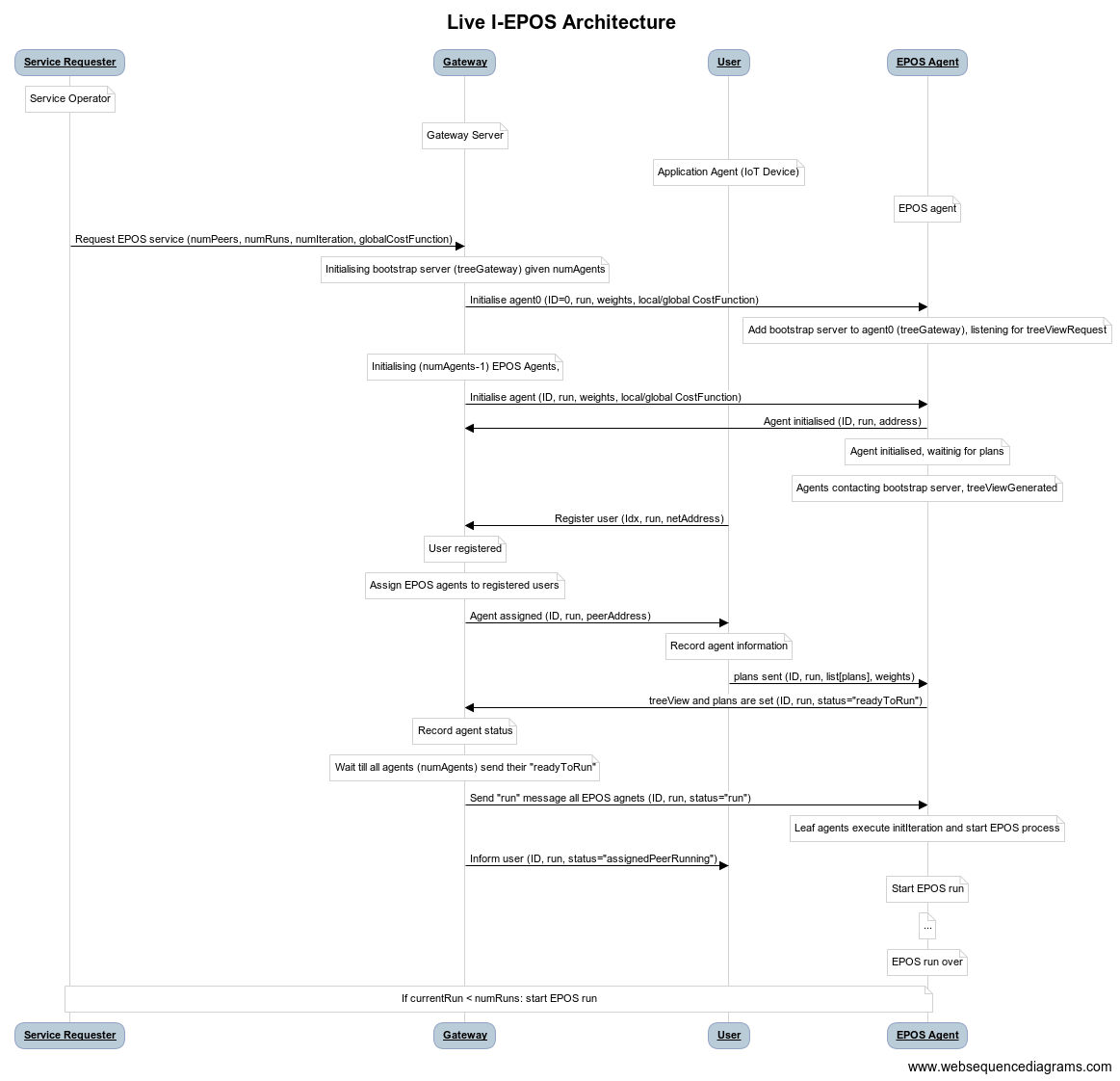
Basic Setup and Live Experiment
In order to perform live experiments, 3 prequisite steps are required:
Setup the database (check Live Run Logging and Database Setup)
Run the persistant daemon (check Live Run Logging and Database Setup step 4)
Run EPOS Live jar file (check Running EPOS Live)
Live Run Logging and Database Setup
Before running EPOS live, few steps need to be taken first:
Start DB: Depending on your installation of postgresSQL, the starting command for the DB differs. For installations on Mac OSX via homebrew, the following command works:
pg_ctl -D /usr/local/var/postgres start.CheckDB: Enter database via the following commands:
cd /tmp; sudo -u postgres psql.Create the database and tables: The tables and sql definitions are in the
/sql/definitions/create.database.sql. After running the SQL commands, check (via\dt) to see if all tables are created correctly.Launch the daemon: Launch the persistance daemon for the database. To do so run
./start.daemon.sh deployments/localhost. The setting to this daemon can be changes in/deployments/localhost/conf/daemon.conf.
If everything is correct, you should see the daemon listening and waitnig for the incoming messages. For more instructions and explanations on the logging system, check Logging & Output.
In order to make the deployment and experimentation in EPOS Live easier, the deployment setup uses JAR files. To run EPOS Live, firstcheck /conf/eposLive.properties. The live deployment uses this file rather than epos.properties. The new parameters include:
maxNumRuns=50000 # each run is the completetion of numIterations EPOS

EPOSRequesterIP=127.0.0.1 # localhost
EPOSRequesterPort=54321 # make sure the port is free
EPOSRequesterPeerID=-100 # makes querying the logs easier

UserIP=127.0.0.1 # localhost
UserPeerID=-200 # make sure the port is free
UserPort=15545 # makes querying the logs easier

GateWayIP=127.0.0.1 # localhost
GateWayPort=12345 # make sure the port is free
GateWayPeerID=-300 # makes querying the logs easier

persistenceDaemonIP=127.0.0.1 # localhost
persistenceDaemonPort=7433 # make sure the port is free

bootstrapPort=12000 # make sure the port is free (peer0)
sleepSecondBetweenRuns=15 # seconds
Make sure the ports and IP’s are open and accessible (check firewall setting).
Running EPOS Live
After setting up the database and daemon, you can run java -jar EPOSRequester.jar. This commands runs the EPOSRequester class, which in turn initiates the gateway and application agents. The gateway will interact with the application agents and creates the EPOS agents. All the mentioned entities as well as the EPOS agenst are initiated inside their own screen (make sure you install screen on your workstation). To check to see everything is working run screen -ls. To connect to a specific screen run screen -r -S [name]. You should now see logs being written to the database in the daemon screen. You can stop everything (except EPOSRequester and the daemon) by executing ./killAll.sh.
You can alway do new experiments by changing the config file.
If you want to change the code and then run EPOS live again, it is advise to create the 4 jar files with each build of the code. The 4 jar files are: EPOSRequester.jar which is the EPOSRequester class and represents the system operator, GateWay.jar which is the GatewayServer class and represents the Gateway, IEPOSNode.jar which are the EPOS agents. Note that each agent is a separate JVM object and experiments with high number of agents required extensive computational resources. And lastly IEPOSUsers.jar which is the User class and represents the application agents. In essence, This class is the event generator of the system.
Main Differences to the Simulation Code
The additional classes are all under the liveRunUtils package. The package has three main sections: DataStructures, Entities, and Messages.
Within the DataStructures, the EPOSPeerStatus and UserStatus are used by the Gateway and User (application agents), respectively, to keep track of the current status of the EPOS and application agents. The ExtendedTreeViewRequest extends the normal treeViewRequest by also communicating the peerID. Within the Entities packages, the new entities (e.g., EPOSRequester, User, and Gateway) are implemented. Lastly, within the Messages package, different message types are implemented.
Changes in the Live Experiment
In
experiment.LiveRunthe following are changed:
This class now initiates only 1 EPOS agent. It is initiated by receiving four arguments:
idx = Integer.parseInt(args [0]); // peerID
peerPort = (args.length >= 2 ? Integer.parseInt(args [1]) : 0 ); // local port
numAgents = (args.length >= 3 ? Integer.parseInt(args [2]) : 0 ); // number of agents currently in the system
initRun = (args.length >= 4 ? Integer.parseInt(args [3]) : 0 ); // from which run should the EPOS agent join
initSim = (args.length >= 5 ? Integer.parseInt(args [4]) : 0 ); // from which sim should the EPOS agent join
After this, each EPOS agent creates a ZMQ context and it persistant client:
ZMQ.Context zmqContext = ZMQ.context(1);
runEPOSLive EPOSapp = new runEPOSLive();
Finally, this class calls the EPOSapp.runEPOS(liveConf,protopeer_conf,zmqContext,numChildren,numIterations,numAgents,initRun,initSim,createAgent,config);.
In
experiment.runEPOSLivethe following are changed:
In contrast to the simulation EPOS, this class initializes a liveEnvironment protopeer experiment (Experiment.initEnvironment();). Additionally, it stores the relevant configurations:
synchronized (MainConfiguration.getSingleton()) {
      // get Protopeer configuration values
      MainConfiguration.getSingleton().peerIndex = liveConf.myIndex;
      MainConfiguration.getSingleton().peerPort = liveConf.myPort;
      MainConfiguration.getSingleton().peerZeroPort = config.bootstrapPort;
      System.out.println("Hi, I'm peer with the index " + MainConfiguration.getSingleton().peerIndex);
      // set IP addresses
      try {
          MainConfiguration.getSingleton().peerIP = InetAddress.getByName(liveConf.myIP);
          MainConfiguration.getSingleton().peerZeroIP = InetAddress.getByName(liveConf.bootstrapIP);

          System.out.println("runDias::peerIP = " + MainConfiguration.getSingleton().peerIP);
          System.out.println("runDias::peerZeroIP = " + MainConfiguration.getSingleton().peerZeroIP);

      } catch (UnknownHostException e) {
          System.out.println("runDias::excepton setting host name : " + e);
          e.printStackTrace();
      }
  }
Additionally, the createPeer function is modified:
public Peer createPeer(int peerIndex, Experiment e) {

          Peer newPeer = new Peer(peerIndex);
          // create a class for persisting message to PostgreSQL
          final int persistenceClientOutputQueueSize = 1000;
          final int diasNetworkId = 0;
          final String daemonConnectString = "tcp://" + config.persistenceDaemonIP + ":" + config.persistenceDaemonPort;
          PersistenceClient persistenceClient = null;
          final boolean persistenceActive = liveConf.persistenceActive,   // all perisistence will be disabled if this is false
                  persistMessages = liveConf.persistMessages,
                  eventLogging = liveConf.eventLogging,
                  vizPersistence = liveConf.vizPersistence;
          final boolean persistAggregationEvent = liveConf.persistAggregationEvent,
                  rawLog = liveConf.rawLog,
                  persistPSSSamples = liveConf.persistPSSSamples;
          final int rawLogLevel = liveConf.rawLogLevel;

          // connect to PostgreSQL logging daemon
          if( persistenceActive ) {
              persistenceClient = new PersistenceClient( zmqContext, daemonConnectString, persistenceClientOutputQueueSize );
              System.out.println( "persistenceClient created" );
          }

          newPeer.SetQueueSizeIn(protopeer_conf.queueSizeIn); // queue size for incoming messages
          newPeer.SetQueueSizeOut(protopeer_conf.queueSizeOut); // queue size for outgoing messages
          newPeer.SetOnFullQueueWait(protopeer_conf.onFullQueueWait); // on full queue, drop or wait
          newPeer.SetQueueVerbose(protopeer_conf.queueVerbose);
          newPeer.addPersistenceClient(persistenceClient, diasNetworkId); // persistant client for each EPOS agent
          Agent newAgent = createAgent.apply(myIndex);
          newAgent.addPersistenceClient(persistenceClient);
          newAgent.setActiveRun(initRun); // current run of the system (when the EPOS agent is joining)
          newAgent.setActiveSim(initSim); // current sim of the system (when the EPOS agent is joining)
          architecture.addPeerlets(newPeer, newAgent, myIndex, numAgents);

          return newPeer;
      }
Changes in the Agents
In
agentthe following are changed:
The constructor is modified not to require the local plans on initialization:
public Agent(CostFunction<V> globalCostFunc, PlanCostFunction<V> localCostFunc, AgentLoggingProvider<? extends Agent> loggingProvider, long seed) {
    this(globalCostFunc, localCostFunc, loggingProvider);
    random.setSeed(seed);
    }
In addition, the following function are added to handle different changes of parameters/plans during runtime:
public void addPlans(List<Plan<V>> possiblePlans){
  // the plans for each peer is sent via the corresponding user via messaging
  this.possiblePlans.clear();
  this.possiblePlans.addAll(possiblePlans);
  plansAreSet = true;
  // informing the gateway that the plans are set
  getPeer().sendMessage(GatewayAddress, new InformGatewayMessage(MainConfiguration.getSingleton().peerIndex, this.activeRun, "plansSet", true));
}
*****
public void setReadyToRun(){
  // ready to run (start iterations), as told by the gateway
  this.readyToRun = true;
}
*****
public void changeGlobalCostFunc(String func){
  // changing the global cost function, as instructed by the gateway
  if (func.equals("VAR")){
      this.globalCostFunc = (CostFunction<V>) new VarCostFunction();
      ((HasGoal) globalCostFunc).populateGoalSignal();
  }
  else if (func.equals("RMSE")){
      this.globalCostFunc = (CostFunction<V>) new RMSECostFunction();
      ((HasGoal) globalCostFunc).populateGoalSignal();
  }
}
In
treeAgentthe following are changed:
The only change is in the setTreeView function, where after the treeView is set, the EPOS agent informs the gateway the indeed it has its treeView and knows its parent and children.
@Override
public void setTreeView(Finger parent, List<Finger> children) {
  if(Configuration.isLiveRun) {
      // in case of a new run, the tree structure might change. Hence the treeView is reset
      resetTreeView();
  }
  this.setParent(parent);
  this.setChildren(children);
  if(!Configuration.isLiveRun) {treeViewIsSet();}
  treeViewIsSet = true;
  if(Configuration.isLiveRun) {
      // informing the gateway that the peer has its treeView set
      ZMQAddress dest = new ZMQAddress(MainConfiguration.getSingleton().peerZeroIP, Configuration.GateWayPort);
      getPeer().sendMessage(dest, new InformGatewayMessage(MainConfiguration.getSingleton().peerIndex, this.activeRun, "treeViewSet", isLeaf()));
  }
}
In
IterativeTreeAgentthe following are changed:
The changes in the IterativeTreeAgent are all regarding to the bootstrapping and managing EPOS runs. This process is explained in more details in Bootsrapping and Managing EPOS Runs
In
MultiObjectiveAgentthe following are changed:
The main change in the MultiObjectiveAgent is in regards to the logging. As the logging is not done live via the database, and simple text-processing techniques of simulation EPOS is no longer feasible and efficient, the logging is done at the top-down phase:
@Override
List<DownMessage> down(DownMessage parentMsg) {
  this.updateGlobalResponse(parentMsg);
  this.updateGlobalDiscomfortScores(parentMsg);
  this.approveOrRejectChanges(parentMsg);
  this.processDownMessageMore(parentMsg);

  // logging for the live implementation
  if (config.Configuration.isLiveRun) {
      new GlobalCostLogger().DBlog(this, globalCostFunc.calcCost(globalResponse));
      new GlobalComplexCostLogger<>().DBlog((Agent) this);
      new GlobalResponseVectorLogger<>().DBlog((Agent) this, globalResponse.toString() + "'");
      new LocalCostMultiObjectiveLogger<>().DBLog((Agent) this, PlanSelectionOptimizationFunctionCollection.localCost(getGlobalDiscomfortSum(), numAgents));
      new SelectedPlanLogger<>().DBLog((MultiObjectiveIEPOSAgent) this);
      if (globalResponse == prevAggregatedResponse) {
          // the run has terminated, logging
          new TerminationLogger<>().DBLog((Agent) this, iteration);
      }
      if (iteration > 0) {
          new UnfairnessLogger<>().DBLog((Agent) this, PlanSelectionOptimizationFunctionCollection.unfairness(getGlobalDiscomfortSum(), getGlobalDiscomfortSumSqr(), numAgents));
      }
  }

  return this.informChildren();
}
Each of the loggers are included with the DBLog(.) function. These logging classes also have the corresponding SQL template that they send to the persistant daemon on initialization. For example, the GlobalCostLogger is modified accordingly:
public void init(Agent agent) {
  if (costFunction == null) {
      costFunction = agent.getGlobalCostFunction();
  }
  if (config.Configuration.isLiveRun) {
      // given that the current run is live, creates the sql template for this logger
      sql_insert_template_custom  = "INSERT INTO GlobalCostLogger(sim,run,peer,iteration,cost) VALUES({sim}, {run}, {peer}, {iteration}, {cost});";
      agent.getPersistenceClient().sendSqlInsertTemplate( new SqlInsertTemplate( "GlobalCostLogger", sql_insert_template_custom ) );}
}
*****
public void DBlog(Agent<V> agent, double cost){
  if (agent.isRepresentative()) {
      LinkedHashMap<String, String> record = new LinkedHashMap<String, String>();
      record.put("sim", String.valueOf(agent.activeSim));
      record.put("run", String.valueOf(agent.activeRun));
      record.put("peer", String.valueOf(agent.getPeer().getIndexNumber()));
      record.put("iteration", String.valueOf(agent.getIteration()));
      record.put("cost", String.valueOf(cost));
      // fills the sql template (refer to the init function for the template
      agent.getPersistenceClient().sendSqlDataItem(new SqlDataItem("GlobalCostLogger", record));
  }

}